Monday, September 17, 2012

Last week, I showed TYLA's rusafe video in order to show acceptable use policies. In doing so, I was reminded of the fact that we have always been citizens of a larger information network. However, a few things have changed since the propaganda of the Civil War and the biases spread during the Crusades.


  1. More people now than ever have access to the information
  2. There is still a large percentage of "uneducated" citizens
  3. Information spreads much quicker
  4. Anyone can spread information to ANYONE
So, how do we combat these new factors and ensure students are digitally literate and good citizens in a digital economy? Well, edutopia is a great place to start with their listing of digital citizenship resources. 

Thursday, September 13, 2012

Batchgeo

Looking for a way to integrate Google Forms and Google Maps? Well, Batchgeo is your answer! Check out the Batchgeo how to below:

Tuesday, September 11, 2012

Another alternative to PowerPoint

I have had many teachers wanting to embed Youtube videos into a PowerPoint. Unfortunately, without downloading the Youtube video, you cannot "embed" the video. You can hyperlink to it, but not embed.

Of course, there is always the option to use Google Presentation, which has made a lot of improvements in functionality over the past year. And, in Presentations, you can embed a Youtube video, but you have to have an Internet connection to show the video/presentation.

So, what's another alternative: SlideRocket.

Check out this SlideRocket presentation on embedding Youtube videos into a SlideRocket presentation. Here, you can also download the presentation with the Youtube video.

Monday, September 10, 2012

Mass text your students and parents? Easy!

Remind 101 is a great tool for classroom teachers and other educators looking for a free and safe way to send text messages to students and parents.

And, it's super easy!

Simply go to Remind 101's Website and sign-up.

Then, you are ready to add your classes. Your classes will be your sender name. For instance, if you create a class called Fenne's Fifth, your text you send to the group will come from Fenne's Fifth. When you create your class, you will be given a code for anyone who wants to be part of the text group. Members will be required to submit a text to the given address with the assigned code. Once they have sent the text, they are part of the group.

And, all you have to do, is type a message in the "send message" box. You can also select your recipient groups.

Standard text messaging rates apply. However, the actual service is free and great for educators wanting to send out notices and reminders to parents and students.

Check it out!

Thursday, September 6, 2012

A nifty trick with Word and Google Forms

Have you ever wanted to transform an existing Word document (or old Word quiz) into a Google Form? Well, you can do it. It doesn't quite have the advanced features, but it can do it in a simple fashion.

Here's how:


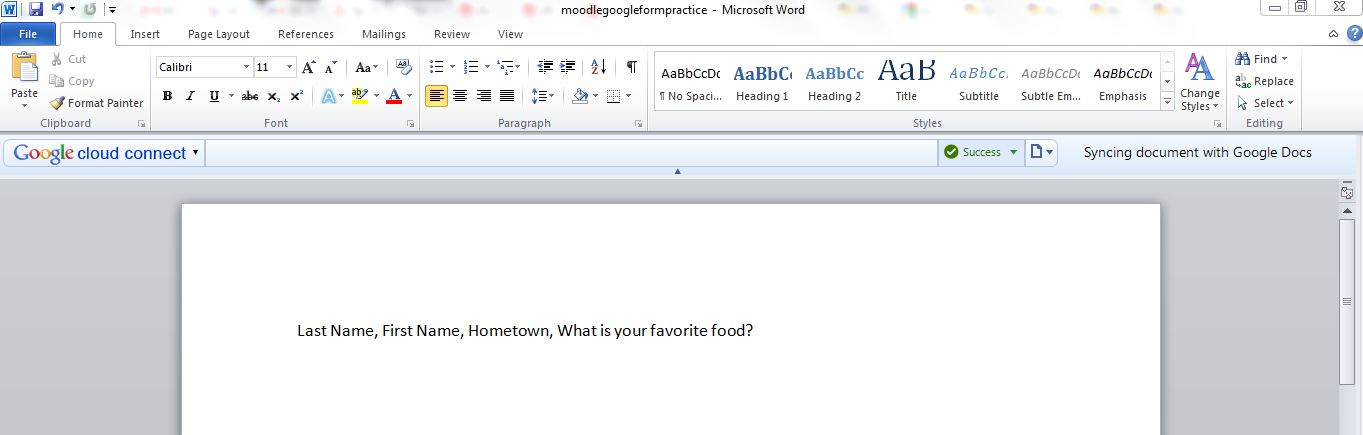
  1. Type in your questions in a Word document. Each question should not be separated by a new line, but by a comma. 

  1. Save the document as a plain text file (.txt)
  2. Go into Google Drive and create a spreadsheet
  3. Select File-->Import and browse for that .txt file
  4. Select Import

  1. Select Open File (blue link next to file name)
  2. In your spreadsheet, click on Tools-->Create Form

  1. Now, your form will open and you can do any last minute editing on it. 
Though, this is an added step, it is helpful if you have existing Word quizzes that you want to make into a survey without retyping all of the questions. 

Wednesday, September 5, 2012

Some cool Chrome applications

Though Google Apps for Education is nearly a complete package, there are several other applications available in the Google Chrome browser that are worth a look:


  • All are great tools for educators and most are free! Check them out!

    Tuesday, September 4, 2012

    Moodle meets GAFE?

    As our district begins to create Google accounts for all students as part of the GAFE development, we look for ways to manage student activity, accounts, and learning. Hapara is one solution to that problem--the teacher dashboard. At the admin level, classrooms can be set up for teachers and students.

    Once the classroom is set up, school-level folders are created for student work. Teachers have the ability to oversee student email. And, teachers even have the ability to manage documents by class and by student and by recent modification.

    Teacher dashboard is a great blend of Moodle and Google--classroom management meets the Google Cloud via GAFE.

    It is an add-on to GAFE; however, it does cost $4 per student. Many districts start small with just a few classrooms. Though, if teacher classroom exists, I believe the capability to expand classroom management software to GAFE exists. So, if your district cannot afford the fee, keep looking--the technology is there!